

Learn step by step how to find an Twitter ID by its user name

What is a Twitter ID and How to Find It
On the X platform, formerly known as Twitter, each account has two key attributes: a username (handle, starting with "@") and a numeric user ID. The latter is a unique, unchangeable number that remains constant no matter how often the username changes. The numeric ID is the fundamental identifier in X’s architecture, required for API interactions and integrations with external services.
Why is this important? Because the username can be changed every day, but the ID always points to the same account. This approach allows developers and analysts to safely identify users when processing data. And for users, it preserves digital identity even when rebranding an account.
In essence, the Twitter ID is a technical synonym for your account. Invisible in the interface but essential in the API, it provides access to account metadata, activity history, and other attributes that cannot be tracked by handle alone.
Username is the "face" of your account. It is displayed publicly, used for login, and is easily recognized by the "@" prefix. However, it can be changed, is limited to 15 characters, and is not necessarily unique in the long term.
The user identifier is the "serial number" assigned when the account is created. It cannot be changed or deleted, is used in the API and X’s internal architecture. All internal addressing on the platform is done by it.
It is especially important not to confuse these two concepts when working with analytics tools, automated bots, APIs, and CRM systems integrated with X.
Methods of Determination
Although X no longer officially displays account IDs in the interface, it is still possible to obtain them. You can use third-party web services specifically designed to find X (Twitter) IDs.
The most reliable and frequently used include:
- https://get-id-x.foundtt.com - simple interface, instant result after entering the username.
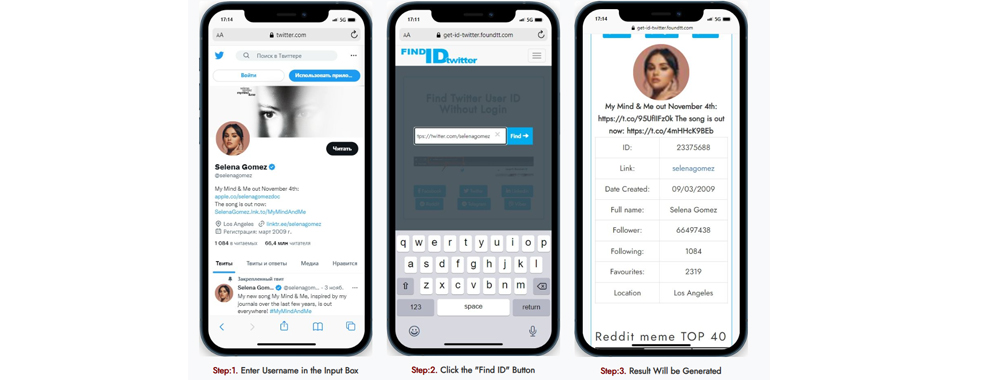
- Find Twitter ID - additionally shows registration date and followers.
- Twitter ID Finder - displays account status and follower count.
- Media Mister - ad-free, limited to 10 searches per day.
- Circleboom - requires registration, allows bulk ID export.
Besides web services, there are also technically oriented methods: the ID can be extracted from the profile image URL, where it often appears after the /banners/ segment or http://a1.twimg.com/profile_images/878669694/twitter_bird_normal.jpg. You can also use API scrapers like Apify if you need to extract data at scale automatically.
Each method has its advantages: simplicity, bulk processing, detail, or automation. The choice depends on your goals, from a single lookup to collecting thousands of IDs for research purposes.
Practical Significance
At first glance, why know this set of numbers if you have a recognizable username? The answer is simple: for accuracy, automation, and scalability. The Twitter ID is required for:
- Most API tools require the ID, not the username, to avoid errors when the @handle changes.
- The same user can change their name, but not their ID—this prevents confusion in analytics and monitoring.
- The lower the ID, the earlier the account was registered. For researchers, this helps segment audiences by registration time.
Difference Between Username and Identifier
Username is the "face" of your account. It is displayed publicly, used for login, and is easily recognized by the "@" prefix. However, it can be changed, is limited to 15 characters, and is not necessarily unique in the long term.
The user identifier is the "serial number" assigned when the account is created. It cannot be changed or deleted, is used in the API and X’s internal architecture. All internal addressing on the platform is done by it.
It is especially important not to confuse these two concepts when working with analytics tools, automated bots, APIs, and CRM systems integrated with X.
List of Platforms - User Choice
| Service | Upvotes | Downvotes |
|---|---|---|
| circleboom.com | 3224 | 185 |
| snaplytics.io | 4361 | 761 |
| commentpicker.com | 3242 | 760 |
| tools.revesery.com | 3295 | 249 |
| randomtools.io | 3356 | 983 |
| tweethunter.io | 3442 | 435 |
| twitterxid.com | 4227 | 534 |
| tweeterid.com | 4285 | 277 |
| ilo.so | 3369 | 457 |
How to Find a Username
Unlike the numeric ID, the username can be found directly in the X interface. It is displayed under the avatar, next to the display name, and is used in the profile URL. If you forgot your handle, you can:
- Check old emails from X—your username is often included in notifications.
- Go to your personal profile, where it is displayed under the avatar.
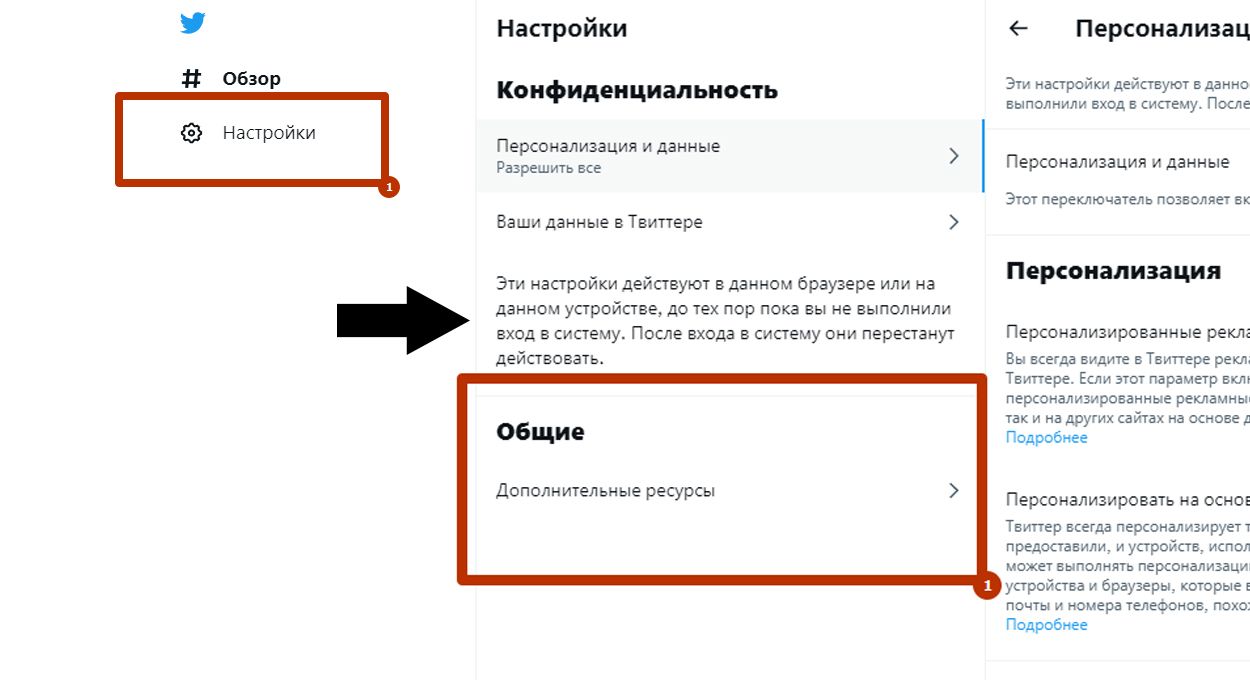
- Download your X archive, which contains the history of name changes and past handles.
Knowing your current and previous usernames can be useful for account recovery, tracking changes, or account verification.
The request you are (were) looking for is: GET https://api.twitter.com/1/users/lookup.json?screen_name=somename
 [
{
"name": "Twitter API",
"profile_sidebar_border_color": "87bc44",
"profile_background_tile": false,
"profile_sidebar_fill_color": "e0ff92",
"location": "San Francisco, CA",
"profile_image_url": "http://a3.twimg.com/profile_images/689684365/api_normal.png",
"created_at": "Wed May 23 06:01:13 +0000 2007",
"profile_link_color": "0000ff",
"favourites_count": 2,
"url": "http://apiwiki.twitter.com",
"contributors_enabled": true,
"utc_offset": -28800,
"id": 6253282,
"profile_use_background_image": true,
"profile_text_color": "000000",
"protected": false,
"followers_count": 160752,
"lang": "en",
"verified": true,
"profile_background_color": "c1dfee",
"geo_enabled": true,
"notifications": false,
"description": "The Real Twitter API. I tweet about API changes, service issues and appily answer questions about
Twitter and our API. Don't get an answer? It's on my website.",
"time_zone": "Pacific Time (US & Canada)",
"friends_count": 19,
"statuses_count": 1858,
"profile_background_image_url":
"http://a3.twimg.com/profile_background_images/59931895/twitterapi-background-new.png",
"status": {
"coordinates": null,
"favorited": false,
"created_at": "Tue Jun 22 16:53:28 +0000 2010",
"truncated": false,
"text": "@Demonicpagan possible some part of your signature generation is incorrect & fails for real reasons..
follow up on the list if you suspect",
"contributors": null,
"id": 16783999399,
"geo": null,
"in_reply_to_user_id": 6339722,
"place": null,
"in_reply_to_screen_name": "Demonicpagan",
"in_reply_to_status_id": 16781827477
},
"screen_name": "twitterapi",
"following": false
},{"name": "Twitter",
"profile_sidebar_border_color": "EEEEEE",
"profile_background_tile": false,
"profile_sidebar_fill_color": "F6F6F6",
"location": "San Francisco, CA",
"profile_image_url": "http://a1.twimg.com/profile_images/878669694/twitter_bird_normal.jpg",
"created_at": "Tue Feb 20 14:35:54 +0000 2007",
"profile_link_color": "038543",
"favourites_count": 2,
"url": "http://twitter.com",
"contributors_enabled": true,
"utc_offset": -28800,
"id": 783214,
"profile_use_background_image": true,
"profile_text_color": "333333",
"protected": false,
"followers_count": 3305606,
"lang": "en",
"verified": true,
"profile_background_color": "ACDED6",
"geo_enabled": true,
"notifications": false,
"description": "Always wondering what's happening. ",
"time_zone": "Pacific Time (US & Canada)",
"friends_count": 257,
"statuses_count": 774,
"profile_background_image_url": "http://s.twimg.com/a/1276896641/images/themes/theme18/bg.gif",
"status": {
"coordinates": null,
"favorited": false,
"created_at": "Tue Jun 22 16:40:19 +0000 2010",
"truncated": false,
"text": "9 cool things to do with your Twitter account (via @pastemagazine) http://example.com",
"contributors": [
16739704
],
"id": 16783169544,
"geo": null,
"in_reply_to_user_id": null,
"place": null,
"source": "web",
"in_reply_to_screen_name": null,
"in_reply_to_status_id": null
},
"screen_name": "twitter",
"following": false
}]Managing Privacy and Discoverability in X
The account identifier cannot be hidden, but you can minimize the likelihood of it being linked to your real identity. X provides several privacy settings for this:
- Disable search by phone and email—in privacy settings, you can uncheck the boxes that allow others to find you by contacts.
- Create a separate account—use a different email and a random @handle with no hint of your identity.
You should also avoid using photos that reveal your identity and duplicating content between public and private accounts. The "Protect your Tweets" setting makes your account private: only approved followers will see your posts.
With a comprehensive approach, you can effectively maintain anonymity without sacrificing platform functionality. However, complete anonymity on X is more of an illusion than an achievable goal.
Top 5 Mobile Apps for Android
| Download Twitter Videos - GIF | X/Twitter Easy Search | Friendly For Twitter/X | Followers Analyzer for Twitter | X (Formerly Twitter) | |
|---|---|---|---|---|---|
| Updated | Oct 01, 2025 | Sep 07, 2025 | May 31, 2025 | Sep 19, 2025 | Sep 24, 2025 |
| Current Version | 2.0.139 | 1.5.2 | 4.5.0 | 5.2.2 | 11.24.0-release.0 |
| Score |
|
|
|
|
|
Top 5 Mobile Apps for iPhone
| Followers Analyzer for Twitter | TwitterIt for Twitter X | X | Friendly for Twitter | Control Panel for Twitter | ChatBae AI - Ask Anything | |
|---|---|---|---|---|---|---|
| Updated | Sep 19, 2025 | Aug 16, 2025 | Sep 20, 2025 | May 04, 2019 | Sep 21, 2025 | Aug 20, 2025 |
| Current Version | 5.2.2 | 4.0 | 11.23 | 1.0 | 4.14.1 | 3.0 |
| Score |
|
|
|
|
|
|
Top 15 X.com Bloggers
| # | Name / Account | Followers | Description | Date Created |
|---|---|---|---|---|
| 1 | Elon Musk (@elonmusk) | 227+ million | 02/06/2009 | |
| 2 | Barack Obama (@BarackObama) | 131+ million | The Office of Barack and Michelle Obama | 06/03/2007 |
| 3 | Donald J. Trump (@realdonaldtrump) | 109+ million | 45th & 47th President of the United States of America?? | 18/03/2009 |
| 4 | Justin Bieber (@justinbieber) | 108+ million | @skylrk | 28/03/2009 |
| 5 | Narendra Modi (@narendramodi) | 108+ million | Prime Minister of India | 10/01/2009 |
| 6 | Rihanna (@rihanna) | 107+ million | 03/10/2009 | |
| 7 | KATY PERRY (@katyperry) | 104+ million | 1432 OUT NOW! | 20/02/2009 |
| 8 | YouTube (@youtube) | 79+ million | like & subscribe | 13/11/2007 |
| 9 | NASA (@NASA) | 77+ million | There's space for everybody. ✨ Verification: https://t.co/8nok3NP4PW | 19/12/2007 |
| 10 | Kim Kardashian (@kimkardashian) | 74+ million | @SKIMS | 19/03/2009 |
| 11 | Selena Gomez (@selenagomez) | 66+ million | My Mind & Me out November 4th: https://t.co/95UfIIFz0k The song is out now: https://t.co/4mHHcK9BEb | 09/03/2009 |
| 12 | Bill Gates (@billgates) | 65+ million | Sharing things I'm learning through my foundation work and other interests. | 24/06/2009 |
| 13 | CNN Breaking News (@cnnbrk) | 63+ million | Breaking news from CNN Digital. Check @cnn for all things CNN, breaking and more. | 02/01/2007 |
| 14 | CNN (@CNN) | 62+ million | It’s our job to #GoThere & tell the most difficult stories. For breaking news, follow @CNNBRK and download our app https://t.co/ceNBoNi8y6 | 09/02/2007 |
| 15 | The New York Times (@nytimes) | 55+ million | News tips? Share them here: https://t.co/ghL9OoYKMM | 02/03/2007 |